The 3D stage
The 3D stage draws the rig as it hangs in the room, so you can plan a show at home and see what a clip looks like from the audience before you're in the venue. It shows what the stage shows: the show as it plays, the blind look in blind mode, and a preset you're trying out. It needs no output and no fixtures connected, and nothing about it reaches the lights.
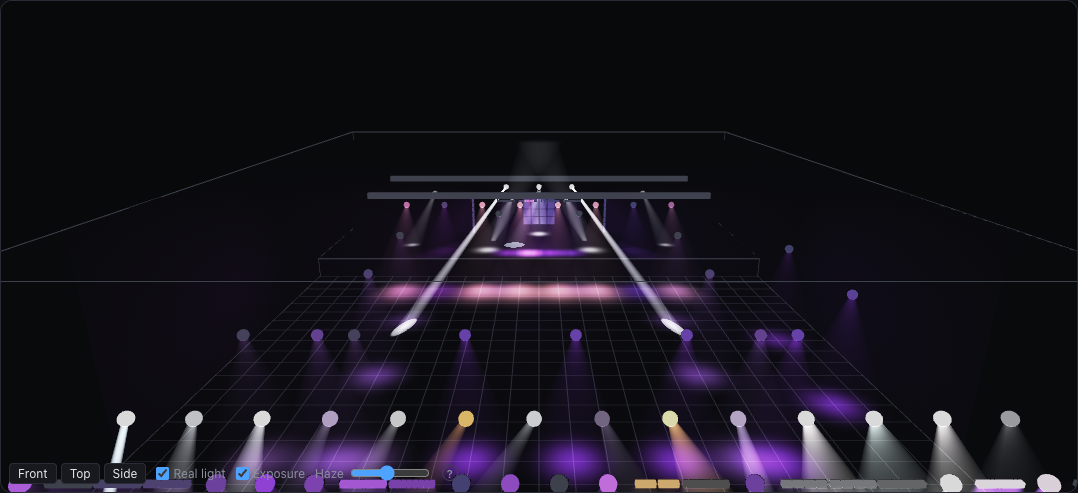
The Visualize layout has it above the launch grid. To put one in a layout of your own, choose 3D stage in the layout editor.
Looking around
Drag to orbit, right-drag (or two fingers) to move sideways, and scroll or pinch to zoom. Front looks from the audience, Top from above and Side from the right.
Haze
Beams only show in haze, as in a real room. The Haze slider sets what's always in the air. A fogger in the rig adds to it while it runs, and that fades over a minute or so after it stops, so a fog cue can be judged too.
Real light
With Real light on, each fixture shows what it really puts out rather than the colors as programmed, so you can spot weak fixtures and weak colors before you're in the venue:
- Brightness between fixtures. Each fixture is drawn against the rig's typical one, from the lumens in its definition. Where a definition gives only the power the fixture draws, the lumens are estimated from it, so treat those as rough. A fixture with neither counts as typical. Four times the lumens looks about twice as bright, as it does to the eye.
- Color wheels. A slot lets through only part of the lamp's light: deep red and deep blue pass a small share, yellow and light colors most of it. What passes depends on the lamp too. Discharge lamps and cool white LEDs are short of deep red, so red on a wheel looks weaker than you might expect, as it does on stage. A tungsten lamp is the other way round.
- LED colors. A color mixed from LEDs shows the LEDs' own colors and brightness: an RGB fixture's red is about a quarter of its full white and its blue about a tenth, and amber, lime and white LEDs add their own.
- Hue and saturation. A light that mixes color by hue and saturation, like a soft panel, shows the color as programmed, since its own LEDs aren't known.
These come from rough models of lamps, filters and LEDs, so they show what to expect rather than measure it. Turn Real light off to see the show's colors as programmed. The choice is remembered on each computer or tablet.
When you choose a fixture type in Add fixtures, it says its lumens, or About … lm, from its power when they're estimated.
Exposure
With Exposure on, the picture's brightness adapts as your eyes would. A few beams in a dark room look as they always did. When much of the rig is on, everything is shown darker to match, so a rig at full keeps its colors and shapes instead of washing out to white. It goes by how much of the picture is bright, the middle counting most, not by how bright its brightest spot is: one beam in your eyes doesn't darken the rest. It adapts over a second or two, sooner to a brighter scene than back to a dark one. What's still brighter than the screen can show eases into white rather than being cut off. Turn it off to see every light added up as it is. The choice is remembered on each computer or tablet.
Fixture shapes
A fixture whose type came from a GDTF file, on its own or in an MVR file, is drawn in the shape the manufacturer gave it: a moving head with its base, its yoke turning as it pans and its head tilting to where the beam goes, a bar or a strobe as its housing. Its beam leaves from the head. Types without such a file are a ball for a head and a box for anything else. Importing an MVR file gives the types you already have their shapes too.
Pixel fixtures
A bar, panel or other fixture with pixels draws its beams as one when its cells point the same way: a single beam shaped like the fixture's face spreading out, colored by whichever cells' light reaches each point. Close to the fixture its cells' shafts stand apart; further out they run together, as real ones do. This keeps a big rig with hundreds of pixels quick to draw. A fixture whose cells point their own ways, like a bar of moving heads, or whose cells have gobos, draws each cell's beam on its own, and so does one with only a few pixels. A fixture whose face is small against how wide its beams are, like a strobe of many LEDs behind one front, is one beam of all its light.
Beam width
A beam is as wide as the fixture's definition says, and a Zoom lane opens and closes it, so narrow is brighter and wide spreads out, in the air and on the floor: twice as wide glows half as bright in the haze, so a wash at a wide zoom is a soft fill beside a tight beam. A beam is drawn as the haze it lights, added up along your line of sight through it, so it looks right from any side: seen along its length, pointing towards you or away, it glows more, as real beams do through haze, and from inside it the haze glows all around you, brightest towards the lens. Each beam ends where it lands, on the floor, a wall or the deck, so a beam slanting onto the floor glows right down to it. Open Fixture Library fixtures mostly state their lens. Where a definition doesn't, a moving head gets a 16° beam, a fixed fixture 40°, and a zoom runs from 10° to 45°.
Gobos, prisms and focus
Fixtures with these tools show them in the beam and where it lands, following the lanes in your clips:
- Gobo cuts its picture into the pool of light and shafts into the beam, and Gobo spin turns it. See Gobo pictures for where the pictures come from.
- Prism splits the beam as the fixture's prism does: into a ring of as many beams as it has facets, or a fan of them in a line for a linear prism, and two prisms together split each beam again, whether they share a channel or the second has its own on Prism 2. Prism spin and Prism 2 spin turn each prism's beams on their own. A prism the definition says nothing about is drawn as the usual three-facet one.
- Focus is sharp at one distance, from 2 m at 0 to 30 m at 1, so a beam blurs as it lands nearer or further than that, and a moving head can drift out of focus as it crosses the room.
- Frost softens the edge and the gobo and spreads the beam a little.
- Iris closes the beam down to a fifth of its width.
Gobo pictures
Many Open Fixture Library fixtures name their gobos, and those are drawn from pictures that come with the app. The app's own fixture types that came from manufacturers' files use simple drawings of ours that resemble each gobo: the same kind of shape or texture, not the manufacturer's artwork. A gobo with no known picture gets a stand-in pattern, which shows when the gobo changes and how it moves, but not what it will look like.
To give a gobo its real picture, select a fixture in the Rig layout and open Gobos. Click a gobo and choose an image, such as one cropped from the fixture's manual. It's cropped to a square, and light passes where it's bright, so Invert swaps light and dark if the picture is drawn the other way round. × goes back to what the gobo had before.
The pictures belong to the fixture type, in the fixture library rather than the show, so every fixture of that type and every show gets them. Editing has to be unlocked to change them.
Getting the rig right
The picture is as good as the rig's measurements. In the layout, select fixtures to set their height, mounting and facing, and Lean for fixtures without pan and tilt. A fixture selected there shows a line down to the floor on the 3D stage while the layout or patch is on screen too, so you can see where it hangs and how high. A fixture hangs at 4 m pointing straight down until you say otherwise.
The room
Room in the Rig layout panel's tools puts a venue around the rig. Add a room sizes one to clear the rig, and Fit to rig does it again later. Set its Width, Depth and Height in meters, and X and Y to place it on the plan. Stage depth and Stage height add a stage deck along the back wall, the end the rig's plan starts from. Trusses are straight runs between two points on the plan, at a height. All of it shows on the plan too, and it's saved with the show.
On the 3D stage, light lands on everything its beam reaches: the floor, the stage deck, the walls and the ceiling, scenery, and the fixtures themselves. A wide wash aimed at the back of the stage lights the deck and the back wall behind it, and a beam that grazes the floor carries on up the wall it reaches, its gobo and color running across the corner. The deck keeps light off what's behind it, a surface that leans away from the beam, or is further off, gets it spread thinner, and one that faces away from it stays dark. The room is kept dark so that the light stands out, and a wall or the ceiling turns to just its outline while you're behind it, so you can always see in. Without a room, the rig stands on an open floor.
Fixtures have their own position and height: a truss or deck doesn't carry them, but dragging one to it puts it there.
Scenery
Set pieces, risers, screens, trusses and the like come in with an MVR file, each with its 3D model, and stand on the 3D stage where the file puts them, in their own colors and pictures, kept dim like the room so that light stands out. Scenery in Room lists them: Shadow says whether a piece stops light, and × takes it away.
Light lands on every piece's own shape, with its gobo and color: a drum riser, a curtain's folds, the people of a band. A piece throws back the light of its own color, so a white deck shows a pool brightly, a red curtain turns it red, and black cloth or a dark screen hardly shows it. A piece also stops light, by its own shape: a truss shadows as a lattice, a curtain as cloth, and the roof and sides of a stage keep the light of the fixtures inside them in. A beam that all lands on a piece ends there in the haze too, and one that half passes a truss shows the gap. Untick Shadow for a piece light should pass, such as a gauze.
Each fixture works out its shadows once, from where it hangs, and again when it or the scenery moves, so they cost next to nothing while a show plays; right after a show opens they fill in over a moment.
Strobe
A strobing fixture flashes on the stage, here and on the 2D stage, as often as the Strobe lane asks: once a second at the slow end to twenty times at the fast end. A fixture whose definition says how fast its strobe goes flashes at that rate, up to as fast as it can; for one that doesn't say, the stage's rate is a guide. Each fixture with its own strobe flashes on its own, as real strobes do, and one faster than the screen redraws flickers every other picture.
What it doesn't show yet
- Scenery is drawn matte: what a model says about shine, glass or see-through parts is left out.
- Fixtures and the room's own trusses don't throw shadows, only scenery and the stage deck do; shadows' edges are a hand's width soft at ten meters; a bar or panel shadows as if all its light left its middle, and light doesn't bounce off surfaces.
- A fixture is drawn in its own shape when its type came from a GDTF file with models; other types keep a ball or a box. A head's base is drawn as it hangs, without its clamp turned to the truss.
- On a rig with more light than your computer draws smoothly, the light is drawn coarser, which softens the edges of pools and gobos a little; it sharpens again when there's less to draw.
- Every prism's beams lean out by the same few degrees, whatever its glass, and a third prism channel follows Prism 2.
- A strobe whose definition doesn't say how fast it flashes is drawn at the rate asked for, which may not be what it does, and a strobe the engine makes by flashing the light is only as quick as the stage's frames.
- Real light uses typical LEDs, lamps and filters, not each fixture's measured ones, and UV is only a violet stand-in.